How To Block Unnecessary Light With Blu-Tack
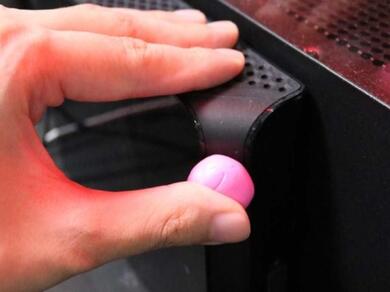
Tired of tiny indicator lights glowing across your desk or nightstand at night? Here's a quick and clever solution: use a small piece of Blu‑Tack,either the classic blue or colorful variant - to gently cover the offending light. The putty subtly blocks the unwanted glow without damaging your device or surface. It’s a simple, reusable hack that brings comfort back to your screen time, sleep space, or ambient setup. 📴💡✨
What you will need
- Any device that emits unnecessary light
Instructions
Step 1
Identify the device where you are bothered with unnecessary light. It can be your laptop, mobile phone, speaker, diffusers, etc.
Step 2
Get small piece of your favorite Blu-Tack. Make sure it’s enough to cover any unnecessary light.
Step 3
You can use and reuse your Blu-Tack to cover any unnecessary light. The best thing about it is that it will never damage your devices.
TIP
Blu-Tack Original and Blu-Tack Colour are available in our ecommerce stores.
Blu Tack
Related Tutorials
Blu Tack® Animals
Blu Tack® Calculator
Cardboard Frog
Easter Egg Basket
Easy Way To Display Your Photos Using Blu-Tack
Family tree project
How To Clean Your Keyboard With Blu Tack
How To Create Mini Sculptures With Blu-Tack
How to do decorations with Blu Tack
How To Keep Your Floor Rugs In Place Using Blu-Tack
How To Mount Your Camera Using Blu-Tack
How to remove Blu Tack® from carpet
How to remove blu tack® stains from a wall
Simple Reverse Prints
Blu Tack® Gecko
Blu Tack® Monsters
Egg Carton Turtles
Finger Balance Challenge
How To Organize Your Power Cords With Blu-Tack